Everything you
need to fly,
in one app.
From your first lesson to the flight levels, NexHawk brings planning, charts, weather, and a friendly AI co-pilot together. Made by pilots, for pilots.


iPhone: App Store › your photo › Redeem Gift Card or Code
Android: Open NexHawk › Marketplace › Maverick Elite › enter the code at checkout
Install NexHawk first, then redeem — the subscription attaches to your store account. Redeem by Dec 31, 2026. Renews at $55.99/quarter unless cancelled — cancel anytime.
Flight simmers: the first 500 pilots get Flight Sim Bridge free, through Dec 31.
Built Different
One App. Every Flight.
Real screenshots from the Android app — the same features come to the browser too.Click any image to enlarge.
Taxi in 3-D. Never cross blind.
Three cockpit views. Fly the one that fits.
Your AI co-pilot, always on board.
Your whole cockpit. One map.
Your full briefing, scored.
Every go/no-go number. One planner.
Every approach, plate-ready.
A full glass cockpit, in your pocket.
Alerts that have your back.
Every layer, working together.
A flight recorder, built in.
Ask your co-pilot anything.
Charts that keep up with you.
Plan smarter. Fly sharper.
Every airport. Every detail.
One app. Every tool.
Beyond the cockpit
Learn, pass, get hired
Test prep for every FAA written exam, the Part 107 drone test, and free guides for building a flying career.
FAA Written Test Prep
Private pilot, instrument and commercial practice questions, every answer explained.
OpenPart 107 Drone Test
Pass the FAA remote pilot exam and fly drones for work.
OpenPilot Jobs
Open pilot and aviation jobs from airlines and operators, updated daily.
OpenPilot Careers
How to become a pilot, what pilots earn, and BasicMed explained.
OpenWatch
See NexHawk in Action
Two short films on what it feels like to fly with every tool in one app.
NexHawk — One App
A cinematic look at the all-in-one cockpit.
Every Tool Pilots Need, In One App
Charts, weather, AI briefings and your watch — the whole toolkit.
Everything in One App
Every Tool Pilots Need
From preflight planning to post-flight review — NexHawk is the only app you need in the cockpit.
Moving Map & Charts
VFR sectionals, IFR low/high enroute, georeferenced approaches, and offline tile support.
AI Co-Pilot
Gemini-powered assistant that briefs your route, summarizes METARs, and answers in plain language.
Live Weather & METARs
Real-time icing, turbulence, wind, precipitation, and graphical briefing imagery from NOAA.
Traffic Awareness
ADS-B traffic via SkyScan 2.0 — live targets, detailed aircraft cards, altitude deltas, and closure-rate alerts.
Digital Logbook
Log flights, track currency, store endorsements — fully cloud-synced and always accessible.
Approach Plates
The full FAA terminal procedures library with georeferenced IAP, SID, STAR overlay support.
Glass Cockpit Suite
Full PFD, HSI, and MFD with synthetic vision — tap any instrument for detailed explainers.
Flight Planning
Build routes, compute fuel, check W&B, file IFR, and get a full graphical briefing.
Wingman Messaging
Pilot-to-pilot real-time messaging with friend requests, badges, and push notifications.
Learning Center LMS
FAA written-test prep, scenario IFR training, procedural simulators, and career milestones.
Flight Sim Bridge
Fly Microsoft Flight Simulator and your phone becomes the moving map, instruments and remote: tune radios, set your squawk, work the autopilot and send your planned route straight into the sim.
NEXRAD & Terrain
Live Doppler radar overlay plus hypsometric (elevation-tinted) terrain shading on the web map.
Nearest Airports
Instant lookup of nearby airports, FBOs, heliports, and navaids — tap any to preflight or file as alternate.
Journey History
Replay every flight as a breadcrumb trail, review altitudes and ground speeds, and attach cockpit photo memories.
Scratchpad
Type or draw quick cockpit notes — frequencies, clearances, ATIS — synced to your account and always there.
Dev Connect
A direct line from the NexHawk team — feature drops, updates, and announcements pushed straight to your cockpit.
Multi-View
Split your screen — run the moving map alongside plates, checklists, or the scratchpad side by side, on phone or tablet.
NexHawk on Your Wrist
Instruments, moving map, plates, traffic, nearest airports, flight plan and Copilot on Apple Watch & Wear OS — streamed live from your phone, with alerts.
Advanced Flight Planner
A real route editor with aircraft loading, weight & balance and a CG diagram, a go/no-go readiness score, fuel-stop planning and trip costs.
AI Weather Briefing
A full preflight briefing with a 100-point Flight Readiness score — winds, hazards, alternates and daylight distilled into a clear go/no-go call.
Fuel Prices
100LL and Jet-A price estimates at any airport, plus real prices reported by the pilot community so you always know where to tanker.
Edge Frame Cockpit
An immersive, map-first cockpit with speed and altitude tapes on the screen edges, adaptive to your phase of flight.
Maintenance + Mechanic AI
Track annual, 100-hour, ADs, TBO and oil with due-date reminders — and ask the built-in AI mechanic what you can legally do as an owner.
Hardware ADS-B
Connect a Stratux or Sentry receiver for real ADS-B In traffic and subscription-free weather, right on the moving map.
Terrain Awareness
Color-coded terrain and obstacle awareness with MSA alerting, so rising ground and towers never take you by surprise.
Multiple Languages
Fly in your language: NexHawk speaks English, Spanish, Mandarin, French, Hindi, Urdu, Bengali, Persian, Amharic and Portuguese.
Horizon Cockpit
Our recommended cockpit: a clean, horizon-led layout with a bottom instrument bar, its own alerts and plenty of room for the map.
Document Library
Official FAA publications built in — handbooks, regulations and advisory material, downloadable for offline reading.
Maneuvers Trainer
Step-by-step reference for the maneuvers you are checked on, each with a drawn diagram and the numbers to fly it.
Weather, Free for Everyone
A living weather scene for any airport with current conditions, the forecast and a refresh on demand. Free on every plan.
Case Files
Real accident reports turned into short lessons: what happened, why, and what to do differently. Included with Afterburner.
Aviation News
Fresh aviation headlines right inside the app, in a clean reader built for quick breaks between flights.
Leaderboards
See how your pilot points, airports visited and distance flown stack up. You appear by pilot number and flag, never your name.
Flight Progress on Your Lock Screen
Distance and time to your next waypoint and destination stay on the lock screen while you fly a plan, on iPhone and Android.
Always-On Instruments
Speed, altitude and heading stay in a slim strip on every screen, so checking a plate or the weather never hides your numbers.
Customize It
Make NexHawk yours: cockpit layout, alert tuning, your own custom alert, map gestures and your hangar of aircraft, all in one place.
Black Box Playback
Replay a recorded flight with its cockpit audio and a readable transcript, then tap any alert to see exactly why it fired.
New · Worldwide
Now Cleared for the Whole World
NexHawk started in the US — now it flies globally. Outside the US you get lifelike international VFR charts, worldwide airport and airspace data, official approach charts on demand, and training tuned to your region.
Lifelike International VFR Charts
Rendered on the moving map with elevation shading, coastlines, navaid roses and VFR reporting points — download by region for offline use.
Worldwide Airport & Airspace Data
Runways, frequencies, navaids and airspace for airports across the globe, powered by OpenAIP and OurAirports.
Official Approach Charts on Demand
Opens the country's official eAIP for instrument approaches — over 25 countries and growing, with nothing copied or redistributed.
Global Live Traffic
SkyScan tracks flights anywhere on Earth — live positions, routes, aircraft photos and emergency-squawk alerts.
Localized Training & Careers
Region-specific written-test prep and licence ladders in the Learning Center and Career Navigator — Canada, UK, Australia, India and more.
Tuned to Your Region
Local fuel-price estimates, sunrise, sunset and twilight, and regional CTAF and airspace conventions.
Speaks Your Language
English, Spanish, Mandarin, French and Canadian French — now joined by Hindi and Urdu, with auto-language on first launch.
A few of the countries pilots are flying NexHawk in
…and many more. US charts and features are unchanged.
New · On Your Wrist
Your Cockpit, on Your Wrist
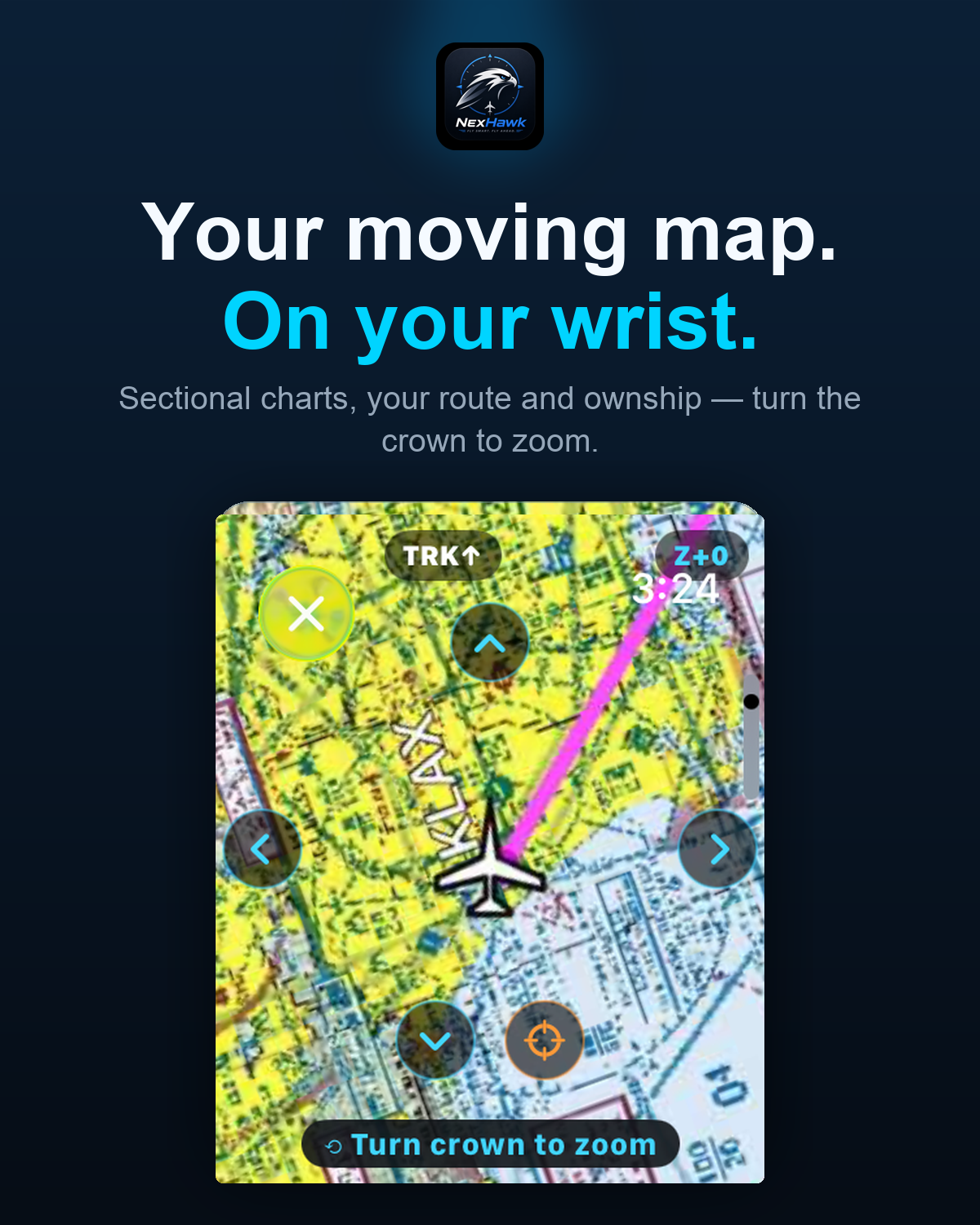
NexHawk now lives on Apple Watch and Wear OS. Glance at your instruments, watch traffic and terrain, pull up an approach plate, or ask Copilot — all streamed live from your phone, no reaching for it required.
- Heading, speed, altitude & VSI at a glance
- Moving map with traffic, terrain & weather
- Approach plates with Digital Crown zoom
- Nearest airports & your active flight plan
- Ask Copilot and read Wingman — hands-free
- Traffic-conflict & message alerts on your wrist
The Whole Panel
Ten instruments. One wrist.
Tap any screen to enlarge.
Instruments + traffic
Moving map
ADS-B traffic scope
Terrain awareness
Approach plates
Glass panel
Airport + fuel
AI Copilot
Nearest airports
Map remote
Afterburner · AI Co-Pilot
Meet Your AI Co-Pilot
Powered by Google Gemini and built directly into the app, NexHawk's Co-Pilot is the first truly intelligent aviation assistant — not a chatbot bolted on the side.
- Briefing summaries in plain language
- Route weather analysis and go/no-go reasoning
- Real-time natural language queries
- Voice-activated commands while airborne
- Context-aware — knows your aircraft, route, and phase of flight
Add-On Subscription
Unlock Afterburner
Go beyond navigation. Afterburner unlocks 17 advanced modules. Click any card to learn more.
Pilot Web Portal
Your Cockpit.
In Any Browser.
More than an app. Sign in to access your achievements, career roadmap, aircraft profiles, documents, and checklists — from any device, any browser.
Same account as the app · Data syncs automatically
Transparent Pricing
Choose Your Flight Level
Start free, upgrade as you grow. Every tier builds on the last — no features ever get removed.
- 5-minute navigation demo
- Basic digital logbook
- Achievement system
- Chart downloads
- Profile & cloud sync
- Help & support center
- Full navigation (no timer)
- VFR sectional charts
- Live weather overlays
- Full digital logbook
- Document manager
- Airport & FBO data
- Everything in VFR
- IFR low/high enroute charts
- Approach plates & SID/STARs
- Digital weather briefing
- Instrument flight tools
- Terminal procedures library
- Everything in IFR
- Afterburner included
- AI Co-Pilot (Gemini)
- Glass Cockpit Suite
- Wingman Messaging
- Career Navigator
- Learning Center LMS
- Black Box Recorder
- Flight Sim Bridge
- Priority support
Desktop Companion
Fly Your Sim. On the Real Map.
Install the free NexHawk MSFS Bridge on your PC and your Microsoft Flight Simulator aircraft drives the NexHawk moving map on your phone, tablet or browser. Tune radios, set your squawk, work the autopilot and send your planned route into the sim. It can start with MSFS, speaks five languages, and nothing else needs installing.
Included with the Flight Sim Bridge license · also unlocked in Maverick Elite.
Why Pilots Choose NexHawk
We built the EFB we wished existed. Every decision was made with a pilot in the left seat.
Built For Pilots
Designed by pilots, for pilots. Every feature maps to a real phase of flight.
Offline Ready
Download charts and databases ahead of time. Critical data available without a signal.
Train. Practice. Improve.
From student pilot to airline ready. Scenario mode, LMS, and career navigator grow with you.
Secure & Private
Secure sign-in, private flight data, and protected connections — your logbook and account stay yours.

Ready to Elevate
Your Flight?
Download NexHawk free. Upgrade to the flight level that fits your journey.
Android 8.0+ · iOS 16.0+ · Free to download